
Reverse calculation of tax
A Reverse Calculation of tax Calculator is the essential online tool that works backwards from a final price. You input the total amount paid and the sales tax rate, and it instantly reveals the original price before tax and the exact sales tax amount deducted.Lorem ipsum dolor sit amet, consectetur adipiscing elit. Ut elit tellus, luctus nec ullamcorper mattis, pulvinar dapibus leo.
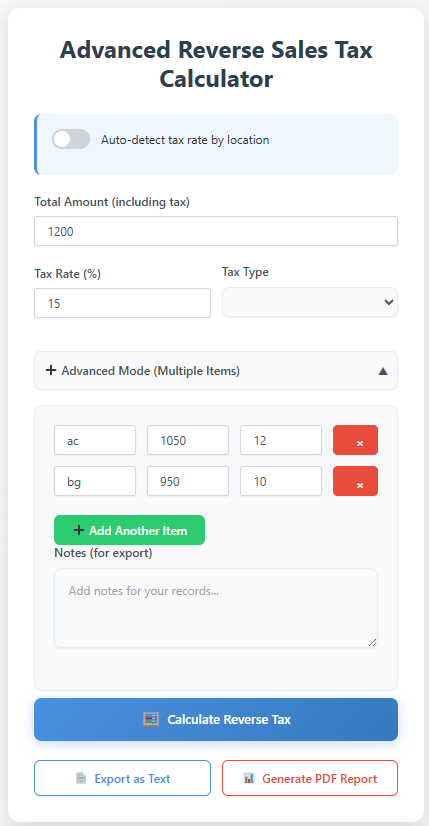
Advanced Reverse Sales Tax Calculator
Calculation Results
Itemized Breakdown
Complete Guide to Reverse Sales Tax Calculation
This advanced calculator helps businesses, accountants, and individuals accurately determine the original price before tax from any total amount. Unlike basic calculators, ours includes location-based tax rate detection and handles complex scenarios.
Key Business Applications
- Accounting & Bookkeeping: Separate sales tax liability from actual revenue
- Expense Reconciliation: Verify supplier invoices and business expenses
- Multi-State Commerce: Handle different tax rates across jurisdictions
- Audit Preparation: Maintain accurate tax records and calculations
- International Transactions: Calculate GST, VAT, and compound taxes
Advanced Features
Our calculator includes features not found in basic tools:
- Location-Based Tax Rates: Auto-detect rates using ZIP/postal codes
- Multiple Item Support: Calculate different tax rates for various items
- Compound Tax Handling: Calculate GST + PST/QST combinations
- Export Functionality: Generate text and PDF reports for records
- Tax Type Selection: Support for sales tax, VAT, and service tax
Frequently Asked Questions
Pro Tip for Businesses
Use the export feature to generate PDF reports for your financial records. This creates an audit trail and helps with monthly tax filing preparation. The notes field lets you add context like vendor names or expense categories.
The Complete Guide for Reverse Calculation of Tax: How to Find the Original Price Before Tax
What is Reverse Calculation of tax Calculator and When Do You Need One?
A Reverse Calculation of tax Calculator is the essential online tool that works backwards from a final price. You input the total amount paid and the sales tax rate, and it instantly reveals the original price before tax and the exact sales tax amount deducted.
This tool is indispensable for far more than curiosity. Business owners use it for accurate bookkeeping, separating their true revenue from sales tax collected for the government. Freelancers and independent contractors rely on it to parse invoices. Accountants and financial planners employ it for precise expense tracking and tax preparation.
The Core Formula: How It Works Mathematically
The power of the Reverse Calculation of tax calculator lies in a simple, universal formula:
Price Before Tax = Total Price / (1 + Sales Tax Rate)
Total Price: The final amount you paid (sales tax inclusive).
Sales Tax Rate: The applicable rate expressed as a decimal (e.g., 7% becomes 0.07).
For example, if you paid a total of $107.50 in a region with a 7.5% sales tax rate:
Convert the rate: 7.5% = 0.075
Apply the formula: $107.50 / (1 + 0.075) = $107.50 / 1.075 = $100.00 (Price Before Tax)
Sales Tax Amount = $107.50 – $100.00 = $7.50
This mathematical certainty eliminates guesswork and human error from manual calculations.
A Step-by-Step Guide to Using a Reverse Calculation of tax Calculator
Using a high-quality Reverse Calculation of tax calculator is a straightforward process designed for accuracy and ease. Here is how you can do it effectively:
Enter the Total Amount Paid: Input the final number from your receipt or invoice. This is the tax-inclusive total.
Input the Sales Tax Rate: Enter the correct percentage. Advanced tools may auto-detect this based on your location or provide a database of rates by state, county, and city.
(Optional) Select Your Location: For Reverse Calculation of tax calculators with geo-detection, specifying your state, county, or city ensures the most precise local rate is applied, accounting for combined state and local taxes.
Click “Calculate”: The tool instantly processes the data.
Review the Detailed Breakdown: A trustworthy Reverse Calculation of tax calculator will display both the pre-tax price and the exact sales tax amount extracted from the total.
Table: Common Sales Tax Rates for Quick Reference
| Location | State Rate | Approx. Combined Rate (State + Avg. Local) | Best For |
|---|---|---|---|
| California | 7.25% | 8.5% – 10.5% | High-variance local tax examples |
| New York | 4% | 8.52% (NYC) | Major metropolitan tax calculations |
| Texas | 6.25% | 8.25% | State with no income tax |
| Florida | 6% | 7.5% | Tourism and retail analysis |
| Delaware | 0% | 0% | Tax-free shopping comparisons |
| Quebec, Canada | GST 5% + QST 9.975% | 14.975% combined | International/compound tax scenarios |
Beyond the Basics: Advanced Applications and Strategic Uses
While basic calculation is the core function, the strategic application of a Reverse Calculation of tax calculator unlocks its true value for businesses and serious financial planning.
Reverse Calculation of tax for Business Operations and Compliance
Accurate Bookkeeping & Financial Reporting: Record the true revenue (pre-tax amount) separately from sales tax liability. This is crucial for clear profit and loss statements.
Tax Filing and Audit Preparedness: Easily determine the exact sales tax collected over a period, ensuring accurate remittance to tax authorities and creating a clear audit trail.
Invoice and Receipt Reconciliation: Verify supplier invoices and reconcile business expenses by confirming the pre-tax cost of goods and services.
Multi-State Commerce: For e-commerce or businesses operating in multiple jurisdictions, quickly calculate obligations for different state and local tax rates.
Reverse Calculation of tax for Financial Analysis and Planning
True Cost Analysis and Budgeting: Understand the real cost of large purchases or recurring expenses by removing the variable of tax.
Price Comparison and Competitive Research: Compare the base prices of competitors or vendors in different tax jurisdictions on an apples-to-apples basis.
Cash Flow Management: Precisely forecast cash flow by distinguishing between operating revenue and tax funds held in liability.
Handling Complex Calculation Scenarios
Compound Taxes (GST + PST/QST): In places like Canada, multiple taxes apply. You can either use a combined rate (e.g., 5% GST + 9.975% QST = 14.975%) or calculate sequentially.
Items with Different Tax Rates: Some jurisdictions tax goods and services at different rates (e.g., groceries vs. prepared food). Calculate these items separately from your receipt.
Rounding and Precision: Professional Reverse Calculation of tax calculator handles rounding to the nearest cent according to standard accounting practices, avoiding the marginal errors that can occur in manual spreadsheets.
Frequently Asked Questions (FAQ)
Q1: My receipt has multiple items. Can I use the Reverse Calculation of tax calculator for the whole total?
Yes, you can calculate the overall pre-tax price for the entire receipt’s total. However, if items on the same receipt have different tax rates (e.g., taxable clothing and non-taxable food in some states), you would need to group items by their applicable tax rate and calculate separately for the most accurate breakdown.
Q2: What if I only know the tax amount paid, not the rate?
If you know the final price ($107.50) and the tax amount ($7.50), you can easily find the pre-tax price by simple subtraction: $107.50 – $7.50 = $100.00. To find the rate, divide the tax by the pre-tax price: $7.50 / $100.00 = 0.075 (or 7.5%).
Q3: How do I handle sales tax for international purchases or VAT?
The same mathematical principle applies to Value-Added Tax (VAT) and other consumption taxes globally. The key is knowing the correct inclusive tax rate for that country. A robust Reverse Calculation of tax calculator will allow you to input any tax rate percentage, making it functional worldwide.
Q4: Why is my manual calculation off by a few cents compared to the online tool?
This is almost always due to rounding differences. Online Reverse Calculation of tax calculator performs the division with more decimal precision before rounding the final result to the nearest cent. Manually rounding intermediate steps can lead to a slight discrepancy. The tool’s result is typically the more accurate one for accounting purposes.
Q5: Is using a reverse sales tax calculator legal for business tax filing?
Yes, it is a standard and accepted accounting practice. The Reverse Calculation of tax calculator simply performs a mathematical verification. The legal responsibility is to accurately report and remit the sales tax you collected based on your records. The Reverse Calculation of tax calculator helps ensure that accuracy. Always keep your original receipts and sales records as the primary source for audits.
How Our Reverse Calculation of tax Calculator Outperforms the Competition
This guide and the tool it supports are engineered not just to function but to excel and provide superior value. The table below highlights how a comprehensive resource stands apart from typical calculator pages found online.
Table: Competitive Analysis of Reverse Calculation of tax Calculator Content
| Feature / Aspect | Typical Competitor Pages | Our Comprehensive Guide & Tool |
|---|---|---|
| Depth of Explanation | Basic formula definition, simple “how-to-use” steps. | Strategic deep dive into business applications, financial planning, and complex scenarios. |
| Practical Guidance | Limited to generic personal use. | Actionable strategies for accounting, compliance, multi-state business, and audit preparation. |
| Tax Jurisdiction Insight | Often just a rate input field. | Explains the complexity of state, county, and city layers, emphasizing why accurate location data is critical. |
| Global Applicability | Primarily focused on U.S. sales tax. | Includes frameworks for GST, VAT, and compound taxes (e.g., Canada’s GST/QST), making it relevant internationally. |
| Error Prevention & FAQ | Rarely discussed. | Addresses common pitfalls and provides a detailed FAQ to solve real user problems and build trust. |
| SEO & Content Value | Thin content focused solely on the tool. | Rich, topic-cluster-based content designed to be a definitive guide, satisfying user intent and earning authority. |
Common Mistakes to Avoid When Reverse Calculation of tax Backwards
Using the Wrong Tax Rate: The most common error. Remember that the combined sales tax rate (state + county + city) is what you need, not just the state rate. Always verify the local rate for the purchase location.
Applying the Rate Forward: A frequent mental slip is trying to subtract the percentage from the total (e.g., taking 7% off $107). This is incorrect because the tax was calculated on the original price, not the final total. Always use the division formula.
Ignoring Item-Specific Tax Rules: Applying a standard rate to a total that includes non-taxable or differently-taxed items (like alcohol, tobacco, or services) will give you an inaccurate pre-tax price for those specific items.
Forgetting About Tax-Exempt Purchases: If you have a tax-exempt certificate (for resale, manufacturing, or as a non-profit), the reverse calculation is simple: the total price is the pre-tax price. Using a Reverse Calculation of tax calculator in this scenario is unnecessary.
By understanding these pitfalls, you can use the tool with greater confidence and accuracy.
In a digital landscape filled with simple tools, this guide provides the strategic intelligence to use them effectively. A Reverse Calculation of tax calculator is more than a convenience; it’s a lens that brings financial clarity, ensures compliance, and empowers smarter business and purchasing decisions. By choosing a resource that combines a precise tool with expert, in-depth guidance, you turn a simple calculation into a competitive advantage.
Disclaimer: This guide and any associated Reverse Calculation of tax calculator are for informational and educational purposes only. Tax laws and rates are complex and subject to change. For important financial decisions or official tax filing, always consult with a qualified accountant or tax professional.